Product Tour
Tools for anyone improving any process
You don't need to be a Lean expert. If you want to measure a process, find the waste, and make it better - ValueStream gives you everything you need. High-quality data capture, structured analysis, and clear next steps.
For Lean practitioners, it ensures consistent, high-quality data. For everyone else, it handles the methodology so you can focus on the improvements.
Capture & Record
Web Recorder
Capture screen-based processes in real time
Guided Recording
Follow templates step-by-step for consistent capture
Gemba Walk
Structured on-site observations with digital capture
Video Analysis
AI-powered video process extraction
Digitize Photo
Convert whiteboard and paper VSMs to digital maps
Import Data
CSV, Excel, and ERP data import
Analyse & Improve
Analytics Dashboard
Lean metrics, bottleneck detection, and waste classification
Smart Suggestions
AI-generated improvement recommendations
What-If Scenarios
Model process changes before implementing them
Industry Benchmarking
Compare your processes against industry averages
Custom KPIs
Define and track your own metrics
Process Simulation
Monte Carlo simulation for data-backed process planning
Product Variant Flows
Map multiple products on a single value stream
Manage & Collaborate
Improvements Board
Kanban-style improvement tracking
Workflow Automations
Trigger actions on events automatically
Template Library
1,001+ templates across 33 industries
Version Comparison
Track improvement over time
Team Workspaces
Role-based access, comments, and sharing
Apps & Integrations
Mobile App
Field recording, offline maps, and barcode scanning
Desktop Recorder
Screen capture and process recording for desktop workflows
REST API
Integrate ValueStream with your existing tools
Integration Marketplace
23 connectors to your existing tools
Platform Highlights
What sets ValueStream apart
Purpose-built for value stream mapping with capabilities no other tool offers: discrete event simulation with animated playback, Apple Watch hands-free recording, NFC/GPS-triggered timing, and financial What-If modelling.
- ✓
Canvas
Visual Map Builder
A professional-grade VSM canvas with 47 standard shapes, 12 connection types, dark mode, and simulation playback animation. Enhanced data boxes display CT, WT, ST, Availability, Yield, OEE, Operators, and Batch Size per station.
Capture
6 Ways to Record a Process
From your wrist to your desk. Record with one-tap mobile timing, Apple Watch hands-free swipe steps, desktop screen capture, GPS waypoint geofences, NFC tag scanning, or the web recorder. All offline-first with live sync.
Teamwork
Built for Teams
Live recording banners show who is recording, on which device, at which step. Real-time presence indicators, cross-map overlays, process merge, and change tracking keep everyone aligned.
Cross-Platform
Every Device, Always in Sync
Web app, iOS/iPad mobile app, Apple Watch standalone, and desktop recorder for Windows, Mac, and Linux. Pair your Watch with a 6-digit code. Everything syncs in real time.
Data Model
Maps, Runs & Analysis
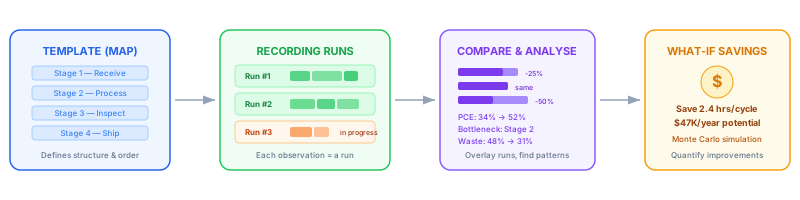
Every process starts as a template that defines the stages. Each time someone records the process, it creates a numbered run (Run #1, #2, #3...). Compare runs to track improvement, then use DES and What-If scenarios to quantify the savings with dollar amounts, ROI, and payback periods.
Ready to see it in action?
Create a free account and start mapping your first value stream in minutes. No credit card required.